


- Posted by: blignos
- Published: 18-02-2026
- Category: Application updates
Bulk Checkpoint Actions for Faster & Smarter Scheduling
At QR-Patrol, we’re constantly improving the way security managers create and manage patrol schedules.
Our latest update introduces a powerful new feature designed to simplify complex scheduling and eliminate repetitive manual work:
Bulk Checkpoint Actions
What’s New?
We’ve improved the Schedule creation experience by grouping all checkpoint-related actions under a single, streamlined entry point:
This new unified approach:
 Moves the existing Copy Checkpoint functionality into one dialog
- Introduces Repeat for interval-based patrols
- Introduces Bulk Update for mass date/time adjustments
The result? Less clutter, better discoverability, and significantly reduced setup time.
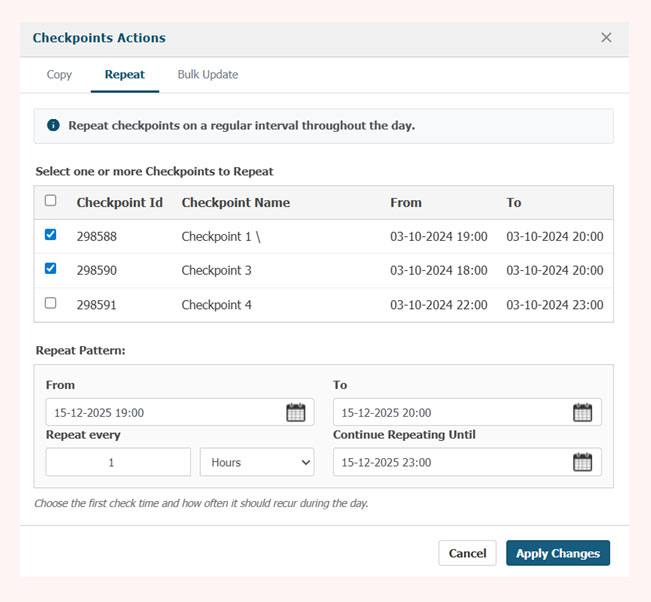
Repeat — Create Interval-Based Patrols in Seconds
Need to schedule patrols every hour? Every 30 minutes?
With Repeat, you can now:
- Select a checkpoint
- Define the time interval
- Automatically generate recurring patrol entries
No more copying and adjusting checkpoints one by one.
Perfect for:
- Hourly patrols
- Interval-based inspections
- High-frequency monitoring sites
Bulk Update — Edit Multiple Checkpoints at Once
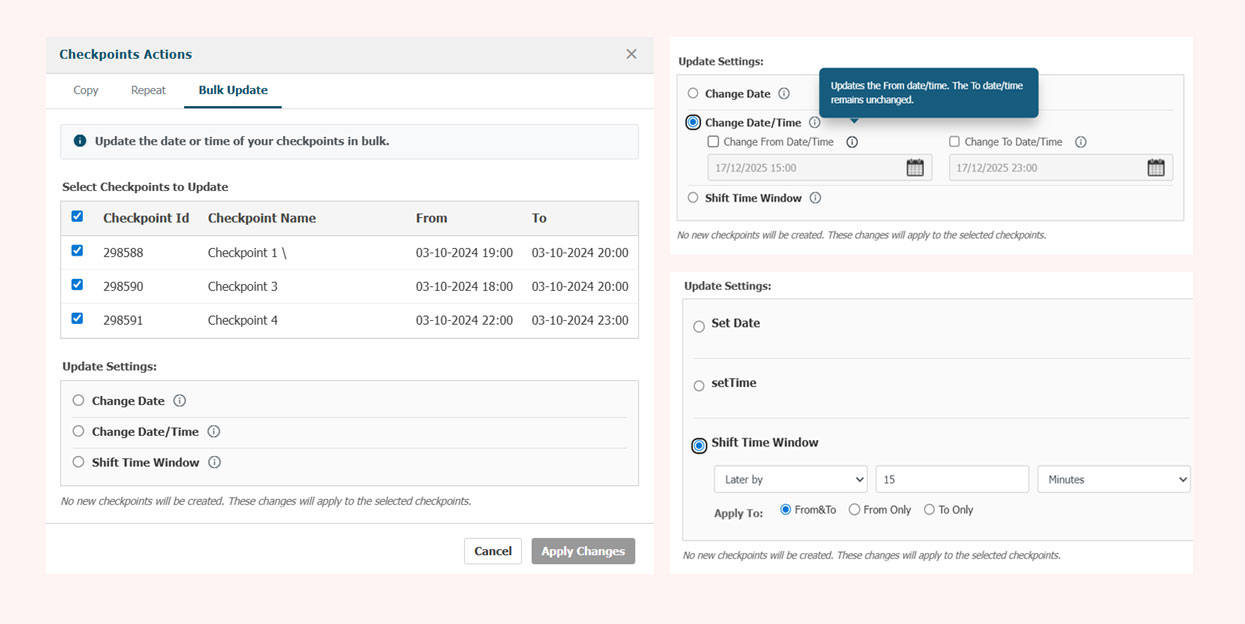
Schedules change — and when they do, you shouldn’t have to edit every checkpoint manually.
With Bulk Update, you can:
- Select multiple checkpoints
- Adjust dates and/or times in one action
- Instantly apply changes across your schedule
This means:
- Fewer mistakes
- Faster last-minute changes
- Cleaner schedule management
What Problem Are We Solving?
Until now, when a manager needed to:
- Repeat checkpoints multiple times during the day (e.g., hourly patrols), or
- Adjust the timing of several checkpoints at once
They had to:
- Use the Copy button repeatedly
- Manually adjust time ranges for each duplicated checkpoint
- Edit checkpoints one by one when dates or times changed
This process was:
- Time-consuming
- Error-prone
- Creating cluttered schedules with too many similar rows
Managing complex patrol schedules should be efficient — not frustrating.
Who Benefits Most?
This update is especially valuable for companies that operate with:
- Strict, structured schedules
- Frequent patrol requirements
- Fixed-time checkpoint scanning
- Sites that require recurring daily patrols
- Operations with frequent schedule changes
If your team manages complex patrol plans, this feature will dramatically reduce setup and adjustment time.
Why It Matters
- Reduces manual setup work
- Minimizes scheduling errors
- Improves clarity in the schedule grid
- Enhances efficiency for managers
- Keeps patrol planning clean and organized
Most importantly, it gives you back valuable time — so you can focus on what truly matters: maintaining safety and operational excellence.
Available Now
The new Bulk Checkpoint Actions feature is now available in your QR-Patrol dashboard.
Log in, explore the new Checkpoint Actions entry point, and experience faster, smarter schedule management today.
If you have any questions or would like assistance exploring the new features, our team is always available to support you. You can also learn more about Schedules Management here.
Thank you for choosing QR-Patrol — and stay tuned for more exciting updates coming soon!