- Posted by: blignos
- Published: 23-11-2016
- Category: QR-Patrol tutorials
How to change your QR-Patrol plan
On a previous How-To guide, we showed you How to buy online. Under this lesson, you will learn how to change your QR-Patrol plan!
In order to change your plan, follow the steps below:
- Visit our Pricing Page and choose your Monthly or Annual Plan - by subscribing to an Annual one, you can save 15% on BASE, PRO plans and 20% on GOLD plan!
(Note: If you have already subscribed to an Annual Plan, we will send you a refund of the remaining months!)
- Then you will receive an email with a new Serial Number.
- Log into your Web Application, click on Settings in the top-right corner and select "Change Plan" from the drop-down menu, as seen in the first picture:

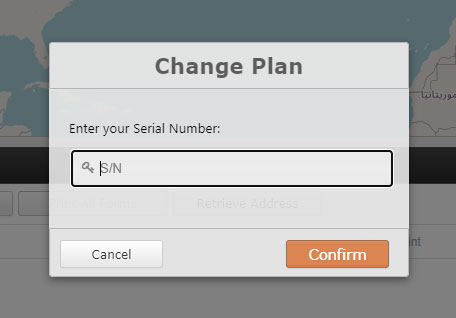
- Finally, fill-in the Serial Number in the pop-up window as seen in the second picture and click "Confirm".
Note: Contact us to cancel your previous QR-Patrol subscription afterwards, such as to avoid double-charges!
Renew an Expired QR-Patrol Account
If your QR-Patrol account has already expired, you can enter your new Serial Number directly from the login screen without first logging into the web app.
When you try to log in to an expired account:
1. The Account Expired window will appear.
2. Enter your new Serial Number.
3. Click Confirm to renew the account.
4. If the Serial Number is valid, your account will be renewed and you will be logged in automatically.
Note: If your account is still active and you want to change your QR-Patrol plan, use Settings → Change Plan as described above.
You are now ready to use your new QR-Patrol plan! For any further inquiry, contact our sales team.